
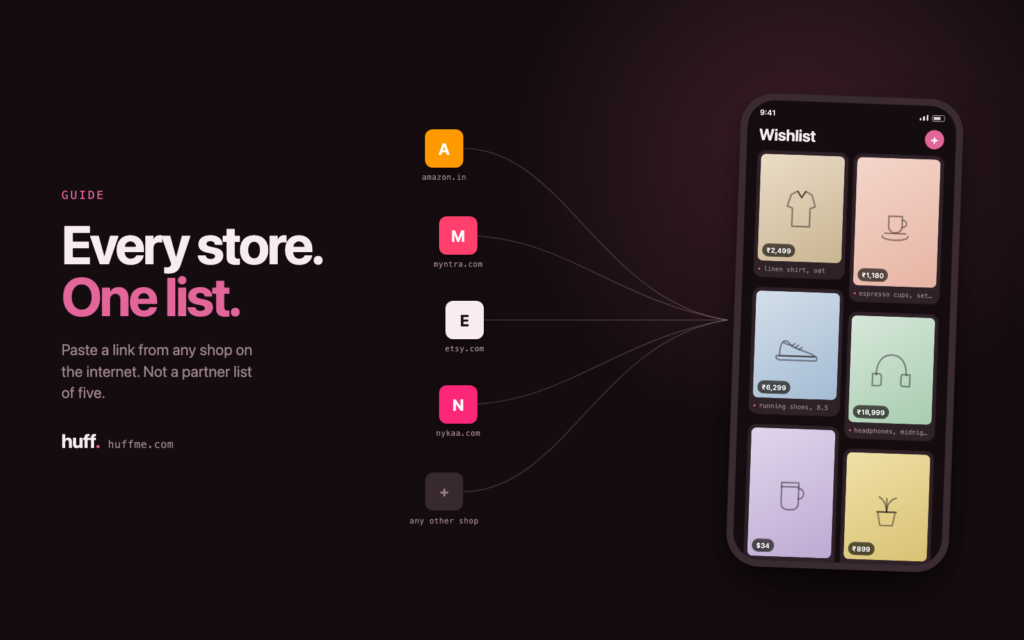
Most people shop across several stores. One site for everyday basics. Another for something niche. A small independent shop for the one item that feels personal. Wishlists have not kept up with this habit. Most wishlist tools are built around a single retailer. If a gift idea comes from anywhere else, it does not fit. It has to be tracked in a separate list, if it gets tracked at all. A universal wishlist solves this. It lets every gift idea live in one shareable list, no matter where it comes from or how small the store is. This guide explains what a universal wishlist is, why single-store lists fall short, and how to build one that actually works for every occasion.
What is a Universal Wishlist?
A universal wishlist is a single list. It holds gift ideas from any online store, not just one retailer. You do not need separate wishlists on Amazon, Target, and Etsy. You add products from any site using a link or a browser tool. They all live together in one shareable list.
This matters because gift-giving rarely happens inside a single store. A birthday list might include a book from an independent shop. It might include shoes from a sneaker site. It might include a gadget from Amazon. A universal wishlist app can hold all three. It does not force anyone into one retailer’s ecosystem.
The mechanics are simpler than they sound. Universal wishlist apps do not connect to each retailer’s backend inventory system. Only a handful of massive registries can do that. Instead, these apps work at the product page level. You copy the link to whatever you want. The app reads that page for the title, image, and price. It saves that snapshot into your list. This works on almost any e-commerce page. It does not matter if the item comes from a giant marketplace or a two-person Etsy shop. The list format is store-agnostic by design. That is what makes it “universal.”
Why Store-Specific Wishlists Fall Short
Before building a multi-store list, it helps to see why single-store lists break down. Most people do not notice the friction until more than a couple of gift-givers get involved.
The Amazon Wishlist Problem
Amazon’s wishlist tool works well for items sold on Amazon. It does not work well for much else. If you want something from a small business, it may not fit. If you want something from a specialty retailer, it may not fit either. The item ends up as a manual note with no working link, no image, and no live price. For people who shop across many retailers, this is a real limitation.
This shows up constantly around holidays and birthdays. Someone finds the exact candle they want from a small boutique. Someone else wants sneakers only sold on the brand’s own site. Neither item fits cleanly into an Amazon list. The workaround is a manual title with no image and no link. That defeats the purpose of a wishlist. A wishlist should make gift-giving effortless. It should not send the giver hunting for a product based on a vague description.
The “Five Different Lists” Problem
Without a universal option, people keep several lists at once. One list per store becomes the natural workaround. Gift-givers then have to check multiple sites to see what is already claimed. This duplicates effort. It also raises the odds of duplicate or unwanted gifts. One consolidated list removes that friction for everyone.
This problem grows with family size. A friend checking one list on the “wrong” store is a minor inconvenience. A large family coordinating a holiday or baby shower across five separate lists is not minor. Each list needs its own account, login, or bookmark. Gift coordination turns into a logistics project. Someone buys a duplicate. Someone else misses a list entirely. The recipient ends up with gifts they did not want, simply because the system made the full picture hard to see.
How to Make a Wish List From Multiple Sites
Once the problem is clear, the fix is mechanical. Building a useful multi-store wishlist comes down to four steps. Skipping any one of them usually produces a list that looks complete but does not get used well.
Step 1: Choose a Universal Wishlist App
Look for an app that lets you add products from any URL. It should not rely on a fixed set of partner retailers. This is the core feature that separates a true universal wishlist from a single-store one.
Test this before committing to an app. Add a link from a small, unfamiliar store, not just a major retailer. See if the app pulls in the image and price correctly. Some apps only work smoothly with a short list of “supported” retailers. That is not truly universal, even if the marketing uses that word. The real test is how the app handles stores you did not expect.
Step 2: Add Items From Any Store
Most universal wishlist apps offer a browser extension. Some offer a share-to-app option. Others use a simple “paste the link” field. You copy the product page URL from any store. The app pulls in the product name, image, and price automatically.
This step replaces the old habit of bookmarking product pages across a dozen open tabs. You no longer need to remember which tab had the sweater and which one had the board game. Everything funnels into one place the moment you find it. This works on your phone during a commute. It also works on desktop while comparison shopping. Low friction to add an item means the list actually reflects what you want.
Step 3: Organize by Occasion
Group items by event: birthday, holiday, baby registry. This keeps the list useful all year. It stops the list from becoming one long, unsorted scroll.
An unsorted list works fine with five items. It stops working once it grows past twenty or thirty. That happens fast once multiple stores are in play. Sorting by occasion also solves a timing issue. An item added in March for a summer birthday should not get buried under twelve items added in November for the holidays. Occasion-based folders or tags keep older, still-relevant items visible.
Step 4: Share One Link
Send a single link to friends and family. Do not point them to multiple retailer accounts. This is where a universal wishlist saves real time. One link replaces five bookmarks.
Privacy settings matter most at this step. A shareable link should give gift-givers enough visibility to browse and claim items. It should not require them to create an account. It should not expose purchase history back to the recipient. Getting this right makes the list feel like a convenience, not one more thing to manage.
Create your Huff wishlist and add items from any store. Then share one link with the people who want to gift you.
Universal Wishlist Apps Compared
Not every “wishlist” tool solves the same problem, even though many use similar language. The table below breaks down the practical differences between a true universal wishlist app, Amazon’s built-in wishlist, and single-retailer gift registries.
| Feature | Universal Wishlist Apps (e.g., Huff) | Amazon Wishlist | Single-Retailer Registries |
| Add items from any store | Yes | No. Amazon items only | No. One retailer only |
| One shareable link for all gifts | Yes | Yes, but Amazon only | Yes, but store specific |
| Prevents duplicate gifts across stores | Yes | Only within Amazon | Only within that store |
| Works for handmade/small-business gifts | Yes | Limited | No |
| Privacy control over who sees the list | Varies by app | Limited | Varies |
The pattern across every row is the same. Store-specific tools work well inside their own ecosystem. They fall apart the moment a gift comes from outside it. Universal wishlist apps assume the opposite. Gifts will come from everywhere, so the tool has to handle that from the start.
This difference matters most for occasions with a wide gift-giver pool: weddings, baby showers, large family holidays. A wedding registry built on one retailer forces guests into an all-or-nothing choice. They either buy from that one store, or go off-list with something the couple did not ask for. A universal wishlist avoids this. The couple can add items from wherever they want, housewares from one store and handmade goods from another. Guests still have exactly one place to check before buying.
Alternatives to Amazon Wishlist Worth Knowing
If the goal is to move away from Amazon’s ecosystem, it helps to know what to compare. Do not just switch to another single-store tool with the same limitation.
- Universal wishlist apps that accept links from any store, including small and independent retailers.
- Privacy-first options that do not require making your list or shopping habits public by default.
- Group-coordination features, such as letting multiple people claim gifts without the recipient seeing who bought what.
These are the differentiators that matter more than brand recognition. A tool that mimics Amazon’s format, just for a different single retailer, does not solve the real problem. The real upgrade treats “any store” as the default, not an exception.
Common Mistakes When Building a Multi-Store Wishlist
Even with the right app, a few habits can undercut a well-built list. Watch for these.
- Mixing occasions into one unsorted list. A single running list with no categories becomes hard for gift-givers to use. Sort by event from the start.
- Skipping price ranges. Adding items without a price range can lead gifters to skip expensive items entirely, instead of considering a lower-cost version.
- Not updating the list. A stale wishlist with sold-out or discontinued items frustrates gift-givers just as much as having no list at all.
- Forgetting to check privacy settings. Some apps make lists publicly searchable by default. Confirm who can actually see the list before sharing it.
Most of these mistakes come from treating a wishlist as a one-time task. It is not. It should be revisited a few times a year. A five-minute check before a birthday or holiday season is usually enough. Remove sold-out items. Add anything new. Confirm who can see the list. That keeps a multi-store wishlist useful instead of letting it go stale.
There is a smaller, easy-to-miss mistake too: adding items without any context. A product name and price tell a gift-giver what something is. They do not always explain why it is wanted, or which size or color fits best. A quick note next to an item takes a few seconds to add. It can be the difference between the right gift arriving and a return trip to the store. Universal wishlist apps that support short notes per item make this easy. Use that feature.
Conclusion
A universal wishlist changes how gift-giving works. It removes the guesswork. It stops the duplicate gifts. It works for big stores and small shops alike. Building one takes four simple steps. Choose the right app. Add items from any site. Organize by occasion. Share one link. A few small habits keep the list useful. Add notes for size or color. Update it before each occasion. Check the privacy settings. Skip tools that only work with one retailer. A universal wishlist app, like Huff, keeps every gift idea in one place. That makes gifting easier for everyone involved.
Is a universal wishlist app free to use?
Most universal wishlist apps, including Huff, are free for basic list creation and sharing. Check individual apps for any premium features.
Can I add items from small or independent stores, not just big retailers?
Yes, that is the main advantage of a universal wishlist. As long as the item has a product page URL, it can usually be added, regardless of the store’s size.
Do the people I share my list with need to create an account?
Usually not, most universal wishlist tools let recipients view and claim items through a shared link without signing up.
Will people see who bought which gift from my list?
That depends on the app’s settings. Many universal wishlist tools let gift-givers claim an item privately, so the recipient does not see who is buying what.
What is the difference between a universal wishlist and a gift registry?
A gift registry is usually tied to one occasion, like a wedding or baby shower, and often to one or a few retailer partners. A universal wishlist is more flexible. It works for any occasion and any store, on an ongoing basis rather than one time.
Can I use a universal wishlist instead of Amazon Wishlist entirely?
Yes. A universal wishlist app can fully replace Amazon Wishlist. It covers Amazon products along with items from any other store, and adds features like one-link sharing across all your gift ideas.